
SERVICES & SOLUTIONS / J0HNVEXCODER
Custom CRM Development
I develop customer-management interfaces around contact records, leads, follow-ups and the history your team needs to understand a relationship.
For teams that need customer records, lead tracking, sales stages and follow-ups in one understandable workflow. Data fields, responsibilities and integrations follow the way the team works.
01 / THE NEED
The problem it can address.
Customer information can become difficult to use when contacts, leads, notes and follow-ups are spread across separate files or tools. A CRM should make the next useful action and the history behind it easier to find, without collecting data the workflow does not need.
02 / THE SOLUTION
What the work can include.
A custom CRM can bring customer and contact records, lead tracking, sales stages, follow-up tasks and reporting into one agreed workflow. Fields, statuses and access follow how your team works. Data import, existing-system connections, API integrations and backend delivery are separately defined and verified within the project scope.
03 / THE APPROACH
Start with the customer relationship.
Start by describing who uses the records, what a lead or customer means in your process and which follow-ups matter. Provide example fields, statuses, reporting needs and existing systems without exposing real customer data in public demonstrations. Atlas and Voyara illustrate fictional/browser-local CRM behavior; they are not evidence of live customer deployments, secure server-side roles or synchronized production databases.
For website content and publishing, explore Custom CMS Development.
For operational records and internal workflows, explore Admin Dashboards & Internal Tools.
THE ENGINEERING / SCOPE TO VERIFY
Connect the record with the next useful action.
A custom CRM should clarify relationship history and responsibility. Automation is useful only when the trigger, action and failure behavior are defined alongside the people using the records.
- 01 / DELIVERY
Map the relationship
Define contacts, leads, sales-pipeline stages and the history users need. Identify the minimum information necessary for each task.
- 02 / DELIVERY
Connect the workflow
Design record views, filters, ownership and follow-up rules. Review API access, imports and notification requirements before including integrations.
- 03 / DELIVERY
Verify the data boundaries
Test agreed save/reload behavior, permissions, imports and automation failures. Document which features are implemented and what needs production infrastructure.
What helps us start
Redacted example records, field and status definitions, user responsibilities and existing-system requirements. Real customer data should not appear in public demonstrations.
- Relationship data models
- Lead & follow-up workflows
- Scoped API integration
Boundaries to agree
A sales-pipeline interface and a secure multiuser CRM are different deliverables. Hosting, authentication, background jobs and third-party connections need explicit implementation and tests.
WORK YOU CAN INSPECT
Selected work. Real context.
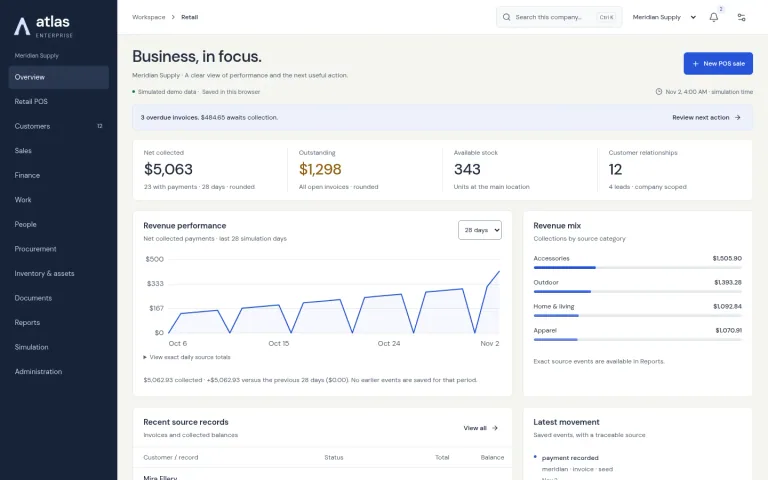
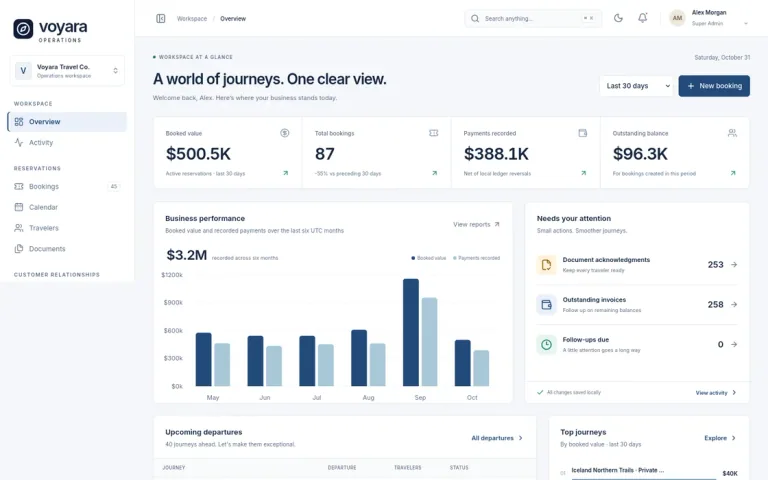
Atlas provides a tested browser-local relationship save/reload and company-scoped CRM views. Voyara demonstrates travel customer-management interfaces with synthetic records. Neither is a live customer-data deployment.
Atlas Enterprise
Atlas Enterprise is an interactive enterprise operations demonstration for five fictional companies. It extends the earlier Voyara travel-operations concept into retail, hospitality, travel, restaurant and professional-services workspaces, with connected records saved in the browser.
- Five fictional company workspaces and a cross-company portfolio overview
- Customer registers with a tested local relationship save and reload
Voyara Operations
Voyara Operations is a travel-operations application demonstration. Its workspace brings reservations, customer relationships, departures, local financial records and content tools into one navigable interface backed by seeded browser-local data.
- Reservation, departure, traveler and customer-management views
- Local payment records, invoices and report interfaces
QUESTIONS ABOUT THIS SERVICE
Scope, explained clearly.
How is a CRM different from a CMS?
A CRM manages customer relationships, leads and follow-ups. A CMS manages website content and publishing. They can be integrated, but their primary users and records are different.
Can it connect to tools we already use?
Integration feasibility, authorized access, API behavior and data handling must be reviewed before those connections are included in the scope. A simulated interface does not prove an existing live integration.
Are the portfolio CRM examples production customer systems?
No. Atlas and Voyara use fictional or synthetic records stored locally in the browser. Their case studies explain what is interactive and what would require a production backend.
What affects the scope of a custom CRM?
Record types, lead stages, follow-up rules, import requirements, reporting and existing-system integrations affect implementation and testing. Data access and backend requirements are agreed separately from a browser-local CRM interface.
What should a CRM project clarify before handover?
Describe the users, example fields, relationship history and acceptance checks without relying on public real-customer records. Agree the implemented workflows, data import/export, account access, source files, ownership and ongoing support in the project scope.
Which CRM tasks should be automated?
Start with the lead-tracking and sales-pipeline steps your team repeats, such as assigning a lead, scheduling a follow-up or changing a stage. CRM workflow automation needs agreed triggers, permissions and approval rules, plus checks for duplicate actions and failed notifications. Automations and connected systems are included only when explicitly scoped and tested.
LET’S DEFINE THE WORK
Tell me what needs
to work better.
Share the current situation, who the website or system serves, and what you need it to do. We can discuss the requirements before defining a proposal.