
SERVICES & SOLUTIONS / J0HNVEXCODER
Admin Dashboard & Internal Tools Development
I build administration interfaces and internal tools around the records, workflows and operational visibility a team needs.
For teams that need operational records, inventory reports and internal tasks connected to the decisions they make. Summaries should lead back to the source records and permitted actions.
01 / THE NEED
The problem it can address.
Teams need to inspect records, understand current activity and carry out routine tasks without moving between disconnected screens. A useful dashboard connects its summaries to the underlying records and actions rather than presenting attractive counters with no working workflow.
02 / THE SOLUTION
What the work can include.
The work can include administration panels, user and record-management interfaces, operational reporting, inventory views, internal tasks and system-monitoring screens. Role-specific interface design is planned around the people using it. APIs, persistent databases, authentication and production integrations are separately scoped engineering work—not features established by a frontend demonstration.
03 / THE APPROACH
Connect the overview to the underlying work.
Identify the records and decisions the dashboard must support, then define the actions, permissions and source data behind each view. Provide workflow examples, current tools and the operational reports users rely on. Atlas and Voyara demonstrate fictional local administration; Nexora Lab demonstrates a release-candidate infrastructure interface with a separate backend and agent architecture. None is an unqualified enterprise-production credential.
For customer records and leads, explore Custom CRM Development.
For website content and editorial workflows, explore Custom CMS Development.
THE ENGINEERING / SCOPE TO VERIFY
Make operational data usable.
Admin panel development starts with the people, records and actions behind the screen. Reporting and business process automation are scoped from real operational needs rather than decorative counters.
- 01 / DELIVERY
Identify decisions and records
Agree which inventory, activity and operational records users need, where they come from and what a useful report must explain.
- 02 / DELIVERY
Design the permitted actions
Build views, filters and role-specific interfaces around the workflow. Define data sources, API contracts and automation approvals separately from the layout.
- 03 / DELIVERY
Validate tasks and exceptions
Test agreed actions, inconsistent inputs, repeated operations and recovery paths. Document backend, authentication and hosting requirements.
What helps us start
Sample operational records, workflow steps, reporting examples and authorized information about current systems. Agree which users can view or change each record.
- Operational data views
- Reporting & inventory
- Access and action boundaries
Boundaries to agree
A frontend dashboard does not by itself include persistent storage, production roles or connected inventory. Those responsibilities are specified and verified when included.
WORK YOU CAN INSPECT
Selected work. Real context.
Atlas demonstrates connected local operations, Nexora Lab documents a release-candidate self-hosted monitoring application, and Voyara demonstrates travel administration. Each case preserves its actual data, backend and deployment limits.
Atlas Enterprise
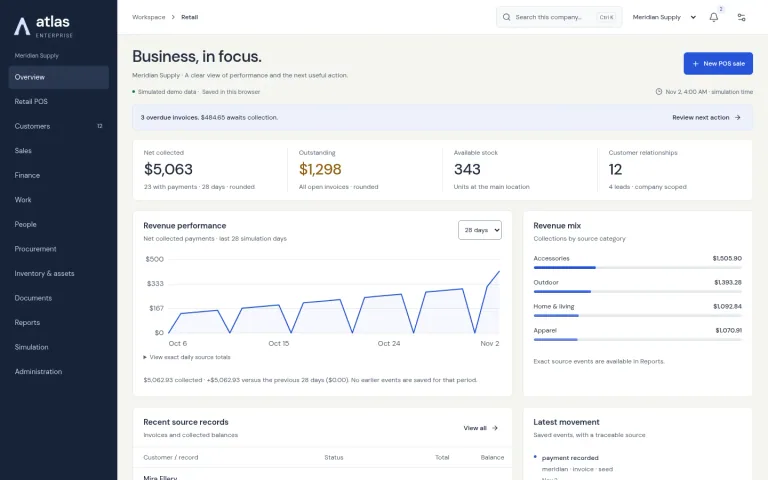
Atlas Enterprise is an interactive enterprise operations demonstration for five fictional companies. It extends the earlier Voyara travel-operations concept into retail, hospitality, travel, restaurant and professional-services workspaces, with connected records saved in the browser.
- Five fictional company workspaces and a cross-company portfolio overview
- Customer registers with a tested local relationship save and reload
Nexora Lab
Nexora Lab is a self-hosted infrastructure dashboard for inspecting Linux hosts, Proxmox guests and Docker workloads. Telemetry, history and topology connect resource readings with the systems they describe.
- Host metrics, history charts, topology and alerts
- Optional Proxmox integration and complementary Agent data
Voyara Operations
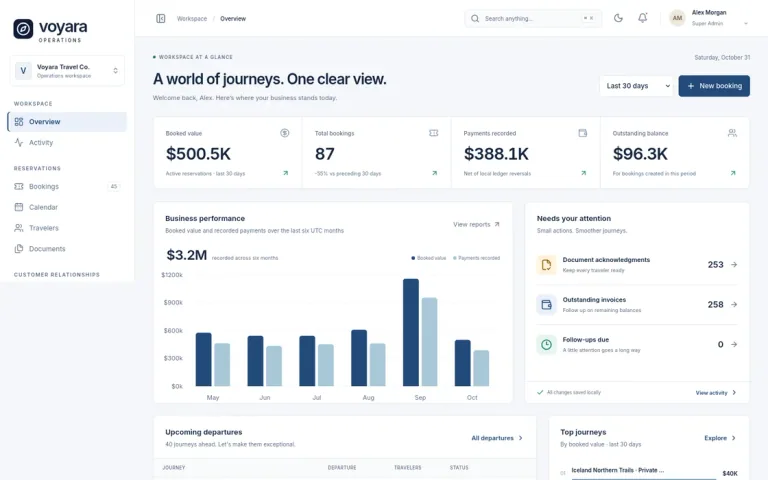
Voyara Operations is a travel-operations application demonstration. Its workspace brings reservations, customer relationships, departures, local financial records and content tools into one navigable interface backed by seeded browser-local data.
- Reservation, departure, traveler and customer-management views
- Local payment records, invoices and report interfaces
QUESTIONS ABOUT THIS SERVICE
Scope, explained clearly.
What makes an internal tool different from a public website?
An internal tool centers on records, tasks and operational decisions for a defined group of users. Its data, access and integration requirements need to be specified independently of the visual interface.
Does a dashboard include a backend and database?
Only when included in the agreed implementation. A browser-local demonstration, a self-hosted personal tool and a production multiuser application have different delivery and verification requirements.
Can a dashboard also include CRM or CMS features?
Yes, when that combination matches the workflow. Customer relationship management and website-content publishing retain their own distinct scope and requirements.
What affects the scope of an admin dashboard?
The records and actions, operational reports, role-specific interfaces, inventory workflows and API or database connections determine the work. A monitoring view and a multiuser management system require different implementation and verification.
What should internal-tool handover cover?
Agree the supported tasks, data sources, access model and acceptance checks before implementation. Handover requirements can include operation and maintenance notes, source files and account access; ownership, third-party licenses and ongoing support need their own explicit scope.
Can an inventory reporting dashboard automate business processes?
An inventory reporting dashboard connects agreed stock records and movement history to the summaries a team uses. Business process automation is scoped around specific actions, such as flagging a stock threshold or preparing a review task. Define the source data, trigger, permissions and approval steps, then test incorrect inputs, repeated actions and failures. Reporting screens alone do not establish a working automation or production integration.
LET’S DEFINE THE WORK
Tell me what needs
to work better.
Share the current situation, who the website or system serves, and what you need it to do. We can discuss the requirements before defining a proposal.